tu as créé un compteur pour l'espace libre. le 1 terra est la valeur pour la journée.
il serait préférable de créer un custom sensor qui affichera correctement la valeur de l'espace restant, même lorsqu'il n'y aura pas de changement par rapport au jour précédent.
[DzVents] Supervision d'un nas Synology avec SNMP
Re: DZVents : Supervision d'un nas Synology avec SNMP
Merci c'est mieux, reste à voir la température des HDD.
Re: DZVents : Supervision d'un nas Synology avec SNMP
Bonjour,
Me revoilà, en faite je ne comprends pas le script ne remonte pas la bonne température des HDD, il reste sur 37° hors avec la ligne de commande il remonte bien 44° d'ou cela peux venir ? l'OID est bon puisque la commande me remonte la bonne valeur, voici le script si une personnes vois un défaut merci.
Me revoilà, en faite je ne comprends pas le script ne remonte pas la bonne température des HDD, il reste sur 37° hors avec la ligne de commande il remonte bien 44° d'ou cela peux venir ? l'OID est bon puisque la commande me remonte la bonne valeur, voici le script si une personnes vois un défaut merci.
Code : Tout sélectionner
--[[
name : synology2.lua
auteur : papoo
creation : 24/08/2018
mise à  jour : 03/09/2018
https://pon.fr/dzvents-supervision-dun-nas-synology-avec-snmp/
https://github.com/papo-o/domoticz_scripts/blob/master/dzVents/scripts/synology2.lua
https://easydomoticz.com/forum/viewtopic.php?f=17&t=7022
https://www.domoticz.com/forum/viewtopic.php?f=59&t=24618
For this script to work you need to enable SNMP on your synology NAS and install SNMP on your Raspberry Pi
Enable SNMP on your synology NAS

Go toMain Menu>Control Panel >SNMP to enable SNMP service, which allows users to monitor
Synology DiskStation network flow with the network management software.
You can use V1/V2
And set a password (Community)
Install SNMP on Raspberry Pi
Log in to you Raspberry Pi and issue:
sudo apt-get install snmpd
sudo apt-get install snmp
Reboot your Pi:
sudo reboot
Check if SNMP is up and running, issue:
snmpget -v 2c -c PASSWORD -O qv NASIPADDRESS 1.3.6.1.4.1.6574.1.5.1.0
Replace PASSWORD with the Community name you entered while setting up your NAS
Replace NASIPADDRESS with the ip address of your NAS
You should get something like this:
"DS218+" which corresponds to your Synology Model
how to choose disk capacity to monitor?
snmpwalk -v 2c -c PASSWORD NASIPADDRESS 1.3.6.1.2.1.25.2.3.1.3
results of my DS218 :
HOST-RESOURCES-MIB::hrStorageDescr.1 = STRING: Physical memory
HOST-RESOURCES-MIB::hrStorageDescr.3 = STRING: Virtual memory
HOST-RESOURCES-MIB::hrStorageDescr.6 = STRING: Memory buffers
HOST-RESOURCES-MIB::hrStorageDescr.7 = STRING: Cached memory
HOST-RESOURCES-MIB::hrStorageDescr.8 = STRING: Shared memory
HOST-RESOURCES-MIB::hrStorageDescr.10 = STRING: Swap space
HOST-RESOURCES-MIB::hrStorageDescr.31 = STRING: /
HOST-RESOURCES-MIB::hrStorageDescr.36 = STRING: /tmp
HOST-RESOURCES-MIB::hrStorageDescr.37 = STRING: /run
HOST-RESOURCES-MIB::hrStorageDescr.38 = STRING: /dev/shm
HOST-RESOURCES-MIB::hrStorageDescr.39 = STRING: /sys/fs/cgroup
HOST-RESOURCES-MIB::hrStorageDescr.40 = STRING: /run/cgmanager/fs
HOST-RESOURCES-MIB::hrStorageDescr.51 = STRING: /volume1
HOST-RESOURCES-MIB::hrStorageDescr.54 = STRING: /volume1/@docker/btrfs
then modify     OID_HDUnit, OID_HDTotal, OID_HDUsed variables with your last number choice (.38 on DSM 5.1, .41 on DSM 6.0+ or .51 on my new DS218)
if you have à DS2XX model, uncomment     -- local OID_HDtemp2='1.3.6.1.4.1.6574.2.1.1.6.1'  to show the hdd2 temperature
Then create:
1 device Switch
1 temperature device
3 percent devices
x meter device
--]]
--------------------------------------------
-------------Fonctions----------------------
--------------------------------------------
function format(str)
   if (str) then
      str = string.gsub (str, " Bytes", "")
      str = string.gsub (str, " kB", "")

   end
   return str
end

-------------------------------------------
-------------Fin Fonctions-----------------
-------------------------------------------

    local NasIp = "192.168.1.5"                                -- NAS IP Address
    local CommunityPassword = "cpbvrc"                        -- SNMP Password
    local NAS = "Synology"                                      -- NAS Switch
    local NAS_TEMP = "Synology Temp"
    local NAS_CPU = "Synology Utilisation CPU"                  -- NAS CPU
    local NAS_MEM = "Synology Utilisation RAM"                  -- NAS MEM
    local NAS_HD_SPACE_PERC = "Synology Occupation Disque"      -- NAS HD Space  in %
    local NAS_HD_SPACE = "Synology Espace Disponible"           -- NAS HD Space  in Go
    local NAS_HD1_TEMP = "Synology HDD1 Temp"                   -- NAS HD1 Temp
    local NAS_HD2_TEMP = "Synology HDD2 Temp"                  -- NAS HD2 Temp
    local OID_NAS_TEMP = '1.3.6.1.4.1.6574.1.2.0'
    local OID_HDUnit = '1.3.6.1.2.1.25.2.3.1.4.51'              -- OID HD Unit Change OID to .38 on DSM 5.1 or .41 on DSM 6.0+ or .51 on my DS218
    local OID_HDTotal = '1.3.6.1.2.1.25.2.3.1.5.51'             -- OID Total space volume in Go Change OID to .38 on DSM 5.1 or .41 on DSM 6.0+ or .51 on my DS218
    local OID_HDUsed = '1.3.6.1.2.1.25.2.3.1.6.51'              -- OID Space used volume in Go Change OID to .38 on DSM 5.1 or .41 on DSM 6.0+ or .51 on my DS218
    local OID_CpuUser = '1.3.6.1.4.1.2021.11.9.0'               -- OID CPU user
    local OID_CpuSystem = '1.3.6.1.4.1.2021.11.10.0'            -- OID CPU System
    local OID_MemAvailable = '1.3.6.1.4.1.2021.4.13.0'          -- OID Free Memory Available
    local OID_HDtemp1 = '1.3.6.1.4.1.6574.2.1.1.6.0'            -- OID Temperature HD1
    local OID_HDtemp2 = '1.3.6.1.4.1.6574.2.1.1.6.1'            -- OID Temperature HD2
    local OID_Raid_Status = '1.3.6.1.4.1.6574.3.1.1.3.0'        -- OID Raid Status
    local OID_Physical_Memory_Units = '1.3.6.1.2.1.25.2.3.1.4.1'
    local OID_Physical_Memory_Size = '1.3.6.1.2.1.25.2.3.1.5.1'
    local OID_Physical_Memory_Used = '1.3.6.1.2.1.25.2.3.1.6.1'

return {
    active = true,
    on = {
    timer = {'every minute'}
    },
   -- on = { devices = { "your trigger device" }},

  logging =   { -- level    =   domoticz.LOG_INFO,                                             -- Seulement un niveau peut être actif; commenter les autres
                -- level    =   domoticz.LOG_ERROR,                                            -- Only one level can be active; comment others
                -- level    =   domoticz.LOG_DEBUG,
                -- level    =   domoticz.LOG_MODULE_EXEC_INFO,
                marker    =   "Synology Monitor v1.1 "      },

    execute = function(dz)
        local i = 0
        local results = {}
        local command = 'snmpget -v 2c -c '..CommunityPassword..' -O qv '..NasIp..' '..OID_NAS_TEMP..' '..OID_HDUnit..' '..OID_HDTotal..' '..OID_HDUsed..' '..OID_CpuUser..' '..OID_CpuSystem..' '..OID_MemAvailable..' '..OID_HDtemp1..' '..OID_HDtemp2 --..' '..OID_Physical_Memory_Units..' '..OID_Physical_Memory_Used..' '..OID_Physical_Memory_Size
        local handle = assert(io.popen(command))
        for line in handle:lines() do
        --for i, line in pairs(handle) do
            --dz.log(format(line).." "..i,dz.LOG_info)
            results[i] =  format(line)
            i = i + 1
        end
        handle:close()
        if results[0] then
            dz.log("NASTemp : "..results[0],dz.LOG_DEBUG)
            if NAS_TEMP then dz.devices(NAS_TEMP).update(0,results[0]) end
            end
        if results[1] then dz.log("HDUnit : "..results[1],dz.LOG_DEBUG) end
        if results[2] then dz.log("HDTotal : "..results[2],dz.LOG_DEBUG) end
        if results[3] then dz.log("HDUsed : "..results[3],dz.LOG_DEBUG) end
        if results[4] then dz.log("CpuUser : "..results[4],dz.LOG_DEBUG) end
        if results[5] then dz.log("CpuSystem : "..results[5],dz.LOG_DEBUG) end
        if results[6] then dz.log("MemAvailable : "..results[6],dz.LOG_DEBUG) end
        if results[7] then
            dz.log("HDTemp1 : "..results[7],dz.LOG_DEBUG)
            if NAS_HDD1_TEMP then dz.devices(NAS_HDD1_TEMP).update(0,results[7]) end
            end
        if results[8] then
            dz.log("HDTemp2 : "..results[8],dz.LOG_DEBUG)
            if NAS_HDD2_TEMP then dz.devices(NAS_HDD2_TEMP).update(0,results[8]) end
            end
        -- if results[9] then dz.log("Physical Memory Units : "..results[9],dz.LOG_DEBUG) end
        -- if results[10] then dz.log("Physical Memory Used : "..results[10],dz.LOG_DEBUG) end
        -- if results[11] then dz.log("Physical Memory Size : "..results[11],dz.LOG_DEBUG) end

        if results[1] and results[2] then
           --local  HDFree = dz.utils.round(((results[2] - results[3]) *  results[1] / 1024 / 1024 / 1024), 1)
           HDTotalGo = dz.utils.round((results[2] *  results[1] / 1024 / 1024 / 1024/1024),2)
           dz.log("HDTotalGo : "..HDTotalGo,dz.LOG_DEBUG)
        end
         if results[1] and results[3] then
           HDUsedGo = dz.utils.round(((results[3]) *  results[1] / 1024 / 1024 / 1024/1024), 2)
           --local  HDUsedGo = (results[3] *  results[1] / 1024 / 1024 / 1024)
           --dz.log("HDUsedGo : "..HDUsedGo,dz.LOG_DEBUG)
        end

        if results[1] and results[2] and results[3] then
           --local  HDFree = dz.utils.round(((results[2] - results[3]) *  results[1] / 1024 / 1024 / 1024), 1)
            HDFreeGo = dz.utils.round(((results[2] - results[3]) *  results[1] / 1024 / 1024 / 1024/1024),2)
           --dz.log("HDFreeGo : "..HDFreeGo,dz.LOG_DEBUG)
        end
        if HDFreeGo then
            dz.log("HDFreeGo : "..HDFreeGo,dz.LOG_DEBUG)
            dz.devices(NAS_HD_SPACE).update(0,HDFreeGo)
            end
        if results[2] and results[3] then
            HDFreePerc = dz.utils.round(((results[3] * 100) / results[2]), 0)
        end
        if HDFreePerc then
            dz.log("HDFreePercent : "..HDFreePerc,dz.LOG_DEBUG)
            dz.devices(NAS_HD_SPACE_PERC).update(0,HDFreePerc)
            end
        if results[4] and results[5] then
            CpuUsed = (results[4] + results[5])
        end
        if CpuUsed then
            dz.log("CpuUsed : "..CpuUsed,dz.LOG_DEBUG)
            dz.devices(NAS_CPU).update(0,CpuUsed)
            end
        if results[6] then
            MemUsedPerc = dz.utils.round((((results[6] / 1024) *100 / 1024)), 0)
        end
        if MemUsedPerc then
            dz.log("MemUsedPercent : "..MemUsedPerc,dz.LOG_DEBUG)
            dz.devices(NAS_MEM).update(0,MemUsedPerc)
            end
        -- if results[9] and results[11] then
            -- MemTotal = dz.utils.round((((results[11] / results[9]) *100 / 1024)), 0)
        -- end
        -- if MemTotal then
            -- dz.log("MemTotal : "..MemTotal,dz.LOG_DEBUG)
            dz.devices(NAS_MEM).update(0,MemUsedPerc)
            -- end


        if results[0] and results[5] and results[6] then
                dz.log("Requete SNMP correcte ",dz.LOG_DEBUG)
                dz.devices(NAS).switchOn().checkFirst()
            else
                dz.log("Requete SNMP incorrecte ",dz.LOG_DEBUG)
                dz.devices(NAS).switchOff().checkFirst()
            end


        --RAID Status :
        --OK(1), Repairing(2), Migrating(3), Expanding(4), Deleting(5), Creating(6), RaidSyncing(7), RaidParityChecking(8), RaidAssembling(9), Canceling(10), Degraded(11), Creashed(12)
    end
}Re: DZVents : Supervision d'un nas Synology avec SNMP
essai de mettre les idx (sans les "") de tes devices au lieu de leur nom voir si cela change quelque chose
Re: DZVents : Supervision d'un nas Synology avec SNMP
J'ai mis l'idx sur les 2 temp HDD mais toujours pareil, j'ai l'impression qu'il ne recois rien car sur les rapports j'ai aucun résultat sur les 24h, si j'active les logs j'ai bien les valeurs.
Je test sur mon autre syno et ma VM pour voir.
Sur mon Syno de la maison un DS216+II pareil, dans les logs c'est bon, mais sur Domoticz ca reste à 0
Je test sur mon autre syno et ma VM pour voir.
Sur mon Syno de la maison un DS216+II pareil, dans les logs c'est bon, mais sur Domoticz ca reste à 0
Code : Tout sélectionner
 2019-02-17 14:54:00.241 Status: dzVents: Info: Synology Monitor v1.1 : ------ Start external script: Synology2.lua:, trigger: every minute
2019-02-17 14:54:00.270 Status: dzVents: Debug: Synology Monitor v1.1 : NASTemp : 26
2019-02-17 14:54:00.273 Status: dzVents: Debug: Synology Monitor v1.1 : Processing device-adapter for Synology Temp: Temperature device adapter
2019-02-17 14:54:00.273 Status: dzVents: Debug: Synology Monitor v1.1 : HDUnit : 4096
2019-02-17 14:54:00.273 Status: dzVents: Debug: Synology Monitor v1.1 : HDTotal : 702106691
2019-02-17 14:54:00.273 Status: dzVents: Debug: Synology Monitor v1.1 : HDUsed : 522351846
2019-02-17 14:54:00.273 Status: dzVents: Debug: Synology Monitor v1.1 : CpuUser : 2
2019-02-17 14:54:00.273 Status: dzVents: Debug: Synology Monitor v1.1 : CpuSystem : 1
2019-02-17 14:54:00.273 Status: dzVents: Debug: Synology Monitor v1.1 : MemAvailable : 10832
2019-02-17 14:54:00.273 Status: dzVents: Debug: Synology Monitor v1.1 : HDTemp1 : 20
2019-02-17 14:54:00.273 Status: dzVents: Debug: Synology Monitor v1.1 : HDTemp2 : 20
2019-02-17 14:54:00.273 Status: dzVents: Debug: Synology Monitor v1.1 : HDTotalGo : 2.62
2019-02-17 14:54:00.273 Status: dzVents: Debug: Synology Monitor v1.1 : HDFreeGo : 0.67
2019-02-17 14:54:00.273 Status: dzVents: Debug: Synology Monitor v1.1 : Processing device-adapter for Synology Espace Disponible: Percentage device adapter
2019-02-17 14:54:00.273 Status: dzVents: Debug: Synology Monitor v1.1 : HDFreePercent : 74
2019-02-17 14:54:00.273 Status: dzVents: Debug: Synology Monitor v1.1 : Processing device-adapter for Synology Occupation Disque: Percentage device adapter
2019-02-17 14:54:00.273 Status: dzVents: Debug: Synology Monitor v1.1 : CpuUsed : 3
2019-02-17 14:54:00.273 Status: dzVents: Debug: Synology Monitor v1.1 : Processing device-adapter for Synology Utilisation CPU: Percentage device adapter
2019-02-17 14:54:00.273 Status: dzVents: Debug: Synology Monitor v1.1 : MemUsedPercent : 1
2019-02-17 14:54:00.273 Status: dzVents: Debug: Synology Monitor v1.1 : Processing device-adapter for Synology Utilisation RAM: Percentage device adapter
2019-02-17 14:54:00.273 Status: dzVents: Debug: Synology Monitor v1.1 : Requete SNMP correcte
2019-02-17 14:54:00.274 Status: dzVents: Debug: Synology Monitor v1.1 : Processing device-adapter for Synology: Switch device adapter
2019-02-17 14:54:00.274 Status: dzVents: Debug: Synology Monitor v1.1 : Constructed timed-command: On
2019-02-17 14:54:00.274 Status: dzVents: Info: Synology Monitor v1.1 : ------ Finished Synology2.lua Re: DZVents : Supervision d'un nas Synology avec SNMP
J'ai trouvé !!!!!!!!!!
Il y a une petite faute dans le script, sur le nom des températures HDD tu as oublié un D à la ligne 93 et 94 sur Github. https://github.com/papo-o/domoticz_scri ... ology2.lua plus bas à la ligne 146 et 150 le nom est "NAS_HDD1_TEMP"
Maintenant c'est bon les 2 HDD remonte biens, je vais maintenant voir pour ajouter le HDD 3 et 4 en commande c'est bon il faut juste que je l'ajoute sur le script.
Il y a une petite faute dans le script, sur le nom des températures HDD tu as oublié un D à la ligne 93 et 94 sur Github. https://github.com/papo-o/domoticz_scri ... ology2.lua plus bas à la ligne 146 et 150 le nom est "NAS_HDD1_TEMP"
Maintenant c'est bon les 2 HDD remonte biens, je vais maintenant voir pour ajouter le HDD 3 et 4 en commande c'est bon il faut juste que je l'ajoute sur le script.
Re: DZVents : Supervision d'un nas Synology avec SNMP
Merci.
correction et mise à jour effectuées
correction et mise à jour effectuées
Re: DZVents : Supervision d'un nas Synology avec SNMP
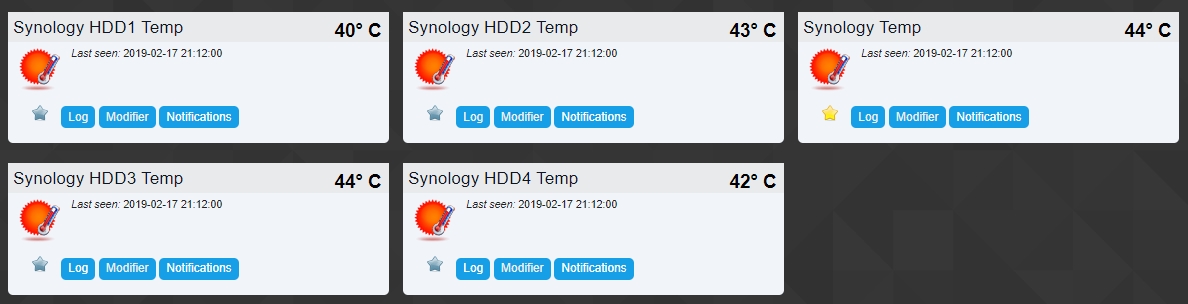
Voilà au niveau des HDD j'ai maintenant les 4 disques qui remonte, je vous partage la modif si cela intéresse des personnes qui on des Nas avec 4 HDD. Pour moi il sert pour un RS814+ papoo si tu peux me dire si pour toi la modif est bonne, j'ai modifié les numéros des résultats en commentaire pour utiliser 9 et 10. Il me reste à voir pour l'utilisation de la Ram qui m'indique seulement 4% alors que j'utilise 29%
Code : Tout sélectionner
--[[
name : synology2.lua
auteur : papoo
creation : 24/08/2018
mise à  jour : 03/09/2018
https://pon.fr/dzvents-supervision-dun-nas-synology-avec-snmp/
https://github.com/papo-o/domoticz_scripts/blob/master/dzVents/scripts/synology2.lua
https://easydomoticz.com/forum/viewtopic.php?f=17&t=7022
https://www.domoticz.com/forum/viewtopic.php?f=59&t=24618
For this script to work you need to enable SNMP on your synology NAS and install SNMP on your Raspberry Pi
Enable SNMP on your synology NAS

Go toMain Menu>Control Panel >SNMP to enable SNMP service, which allows users to monitor
Synology DiskStation network flow with the network management software.
You can use V1/V2
And set a password (Community)
Install SNMP on Raspberry Pi
Log in to you Raspberry Pi and issue:
sudo apt-get install snmpd
sudo apt-get install snmp
Reboot your Pi:
sudo reboot
Check if SNMP is up and running, issue:
snmpget -v 2c -c PASSWORD -O qv NASIPADDRESS 1.3.6.1.4.1.6574.1.5.1.0
Replace PASSWORD with the Community name you entered while setting up your NAS
Replace NASIPADDRESS with the ip address of your NAS
You should get something like this:
"DS218+" which corresponds to your Synology Model
how to choose disk capacity to monitor?
snmpwalk -v 2c -c PASSWORD NASIPADDRESS 1.3.6.1.2.1.25.2.3.1.3
results of my DS218 :
HOST-RESOURCES-MIB::hrStorageDescr.1 = STRING: Physical memory
HOST-RESOURCES-MIB::hrStorageDescr.3 = STRING: Virtual memory
HOST-RESOURCES-MIB::hrStorageDescr.6 = STRING: Memory buffers
HOST-RESOURCES-MIB::hrStorageDescr.7 = STRING: Cached memory
HOST-RESOURCES-MIB::hrStorageDescr.8 = STRING: Shared memory
HOST-RESOURCES-MIB::hrStorageDescr.10 = STRING: Swap space
HOST-RESOURCES-MIB::hrStorageDescr.31 = STRING: /
HOST-RESOURCES-MIB::hrStorageDescr.36 = STRING: /tmp
HOST-RESOURCES-MIB::hrStorageDescr.37 = STRING: /run
HOST-RESOURCES-MIB::hrStorageDescr.38 = STRING: /dev/shm
HOST-RESOURCES-MIB::hrStorageDescr.39 = STRING: /sys/fs/cgroup
HOST-RESOURCES-MIB::hrStorageDescr.40 = STRING: /run/cgmanager/fs
HOST-RESOURCES-MIB::hrStorageDescr.51 = STRING: /volume1
HOST-RESOURCES-MIB::hrStorageDescr.54 = STRING: /volume1/@docker/btrfs
then modify     OID_HDUnit, OID_HDTotal, OID_HDUsed variables with your last number choice (.38 on DSM 5.1, .41 on DSM 6.0+ or .51 on my new DS218)
if you have à DS2XX model, uncomment     -- local OID_HDtemp2='1.3.6.1.4.1.6574.2.1.1.6.1'  to show the hdd2 temperature
Then create:
1 device Switch
1 temperature device
3 percent devices
x meter device
--]]
--------------------------------------------
-------------Fonctions----------------------
--------------------------------------------
function format(str)
   if (str) then
      str = string.gsub (str, " Bytes", "")
      str = string.gsub (str, " kB", "")

   end
   return str
end

-------------------------------------------
-------------Fin Fonctions-----------------
-------------------------------------------

    local NasIp = "192.168.1.5"                                -- NAS IP Address
    local CommunityPassword = "cpbvrc"                        -- SNMP Password
    local NAS = "Synology"                                      -- NAS Switch
    local NAS_TEMP = "Synology Temp"
    local NAS_CPU = "Synology Utilisation CPU"                  -- NAS CPU
    local NAS_MEM = "Synology Utilisation RAM"                  -- NAS MEM
    local NAS_HD_SPACE_PERC = "Synology Occupation Disque"      -- NAS HD Space  in %
    local NAS_HD_SPACE = "Synology Espace Disponible"           -- NAS HD Space  in Go
    local NAS_HDD1_TEMP = "Synology HDD1 Temp"                  -- NAS HDD1 Temp
    local NAS_HDD2_TEMP = "Synology HDD2 Temp"                  -- NAS HDD2 Temp
	local NAS_HDD3_TEMP = "Synology HDD3 Temp"                  -- NAS HDD3 Temp
	local NAS_HDD4_TEMP = "Synology HDD4 Temp"                  -- NAS HDD4 Temp
    local OID_NAS_TEMP = '1.3.6.1.4.1.6574.1.2.0'
    local OID_HDUnit = '1.3.6.1.2.1.25.2.3.1.4.51'              -- OID HD Unit Change OID to .38 on DSM 5.1 or .41 on DSM 6.0+ or .51 on my DS218
    local OID_HDTotal = '1.3.6.1.2.1.25.2.3.1.5.51'             -- OID Total space volume in Go Change OID to .38 on DSM 5.1 or .41 on DSM 6.0+ or .51 on my DS218
    local OID_HDUsed = '1.3.6.1.2.1.25.2.3.1.6.51'              -- OID Space used volume in Go Change OID to .38 on DSM 5.1 or .41 on DSM 6.0+ or .51 on my DS218
    local OID_CpuUser = '1.3.6.1.4.1.2021.11.9.0'               -- OID CPU user
    local OID_CpuSystem = '1.3.6.1.4.1.2021.11.10.0'            -- OID CPU System
    local OID_MemAvailable = '1.3.6.1.4.1.2021.4.13.0'          -- OID Free Memory Available
    local OID_HDtemp1 = '1.3.6.1.4.1.6574.2.1.1.6.0'            -- OID Temperature HDD1
    local OID_HDtemp2 = '1.3.6.1.4.1.6574.2.1.1.6.1'            -- OID Temperature HDD2
	local OID_HDtemp3 = '1.3.6.1.4.1.6574.2.1.1.6.2'            -- OID Temperature HDD3
	local OID_HDtemp4 = '1.3.6.1.4.1.6574.2.1.1.6.3'            -- OID Temperature HDD4
    local OID_Raid_Status = '1.3.6.1.4.1.6574.3.1.1.3.0'        -- OID Raid Status
    local OID_Physical_Memory_Units = '1.3.6.1.2.1.25.2.3.1.4.1'
    local OID_Physical_Memory_Size = '1.3.6.1.2.1.25.2.3.1.5.1'
    local OID_Physical_Memory_Used = '1.3.6.1.2.1.25.2.3.1.6.1'

return {
    active = true,
    on = {
    timer = {'every minute'}
    },
   -- on = { devices = { "your trigger device" }},

  logging =   { -- level    =   domoticz.LOG_INFO,                                             -- Seulement un niveau peut être actif; commenter les autres
                -- level    =   domoticz.LOG_ERROR,                                            -- Only one level can be active; comment others
                -- level    =   domoticz.LOG_DEBUG,
                -- level    =   domoticz.LOG_MODULE_EXEC_INFO,
                marker    =   "Synology Monitor v1.1 "      },

    execute = function(dz)
        local i = 0
        local results = {}
        local command = 'snmpget -v 2c -c '..CommunityPassword..' -O qv '..NasIp..' '..OID_NAS_TEMP..' '..OID_HDUnit..' '..OID_HDTotal..' '..OID_HDUsed..' '..OID_CpuUser..' '..OID_CpuSystem..' '..OID_MemAvailable..' '..OID_HDtemp1..' '..OID_HDtemp2..' '..OID_HDtemp3..' '..OID_HDtemp4 --..' '..OID_Physical_Memory_Units..' '..OID_Physical_Memory_Used..' '..OID_Physical_Memory_Size
        local handle = assert(io.popen(command))
        for line in handle:lines() do
        --for i, line in pairs(handle) do
            --dz.log(format(line).." "..i,dz.LOG_info)
            results[i] =  format(line)
            i = i + 1
        end
        handle:close()
        if results[0] then
            dz.log("NASTemp : "..results[0],dz.LOG_DEBUG)
            if NAS_TEMP then dz.devices(NAS_TEMP).update(0,results[0]) end
            end
        if results[1] then dz.log("HDUnit : "..results[1],dz.LOG_DEBUG) end
        if results[2] then dz.log("HDTotal : "..results[2],dz.LOG_DEBUG) end
        if results[3] then dz.log("HDUsed : "..results[3],dz.LOG_DEBUG) end
        if results[4] then dz.log("CpuUser : "..results[4],dz.LOG_DEBUG) end
        if results[5] then dz.log("CpuSystem : "..results[5],dz.LOG_DEBUG) end
        if results[6] then dz.log("MemAvailable : "..results[6],dz.LOG_DEBUG) end
        if results[7] then
            dz.log("HDTemp1 : "..results[7],dz.LOG_DEBUG)
            if NAS_HDD1_TEMP then dz.devices(NAS_HDD1_TEMP).update(0,results[7]) end
            end
        if results[8] then
            dz.log("HDTemp2 : "..results[8],dz.LOG_DEBUG)
            if NAS_HDD2_TEMP then dz.devices(NAS_HDD2_TEMP).update(0,results[8]) end
            end

		if results[9] then
            dz.log("HDTemp3 : "..results[9],dz.LOG_DEBUG)
            if NAS_HDD3_TEMP then dz.devices(NAS_HDD3_TEMP).update(0,results[9]) end
            end
        if results[10] then
            dz.log("HDTemp4 : "..results[10],dz.LOG_DEBUG)
            if NAS_HDD4_TEMP then dz.devices(NAS_HDD4_TEMP).update(0,results[10]) end
            end
        -- if results[11] then dz.log("Physical Memory Units : "..results[11],dz.LOG_DEBUG) end
        -- if results[12] then dz.log("Physical Memory Used : "..results[12],dz.LOG_DEBUG) end
        -- if results[13] then dz.log("Physical Memory Size : "..results[13],dz.LOG_DEBUG) end

        if results[1] and results[2] then
           --local  HDFree = dz.utils.round(((results[2] - results[3]) *  results[1] / 1024 / 1024 / 1024), 1)
           HDTotalGo = dz.utils.round((results[2] *  results[1] / 1024 / 1024 / 1024/1024),2)
           dz.log("HDTotalGo : "..HDTotalGo,dz.LOG_DEBUG)
        end
         if results[1] and results[3] then
           HDUsedGo = dz.utils.round(((results[3]) *  results[1] / 1024 / 1024 / 1024/1024), 2)
           --local  HDUsedGo = (results[3] *  results[1] / 1024 / 1024 / 1024)
           --dz.log("HDUsedGo : "..HDUsedGo,dz.LOG_DEBUG)
        end

        if results[1] and results[2] and results[3] then
           --local  HDFree = dz.utils.round(((results[2] - results[3]) *  results[1] / 1024 / 1024 / 1024), 1)
            HDFreeGo = dz.utils.round(((results[2] - results[3]) *  results[1] / 1024 / 1024 / 1024/1024),2)
           --dz.log("HDFreeGo : "..HDFreeGo,dz.LOG_DEBUG)
        end
        if HDFreeGo then
            dz.log("HDFreeGo : "..HDFreeGo,dz.LOG_DEBUG)
            dz.devices(NAS_HD_SPACE).update(0,HDFreeGo)
            end
        if results[2] and results[3] then
            HDFreePerc = dz.utils.round(((results[3] * 100) / results[2]), 0)
        end
        if HDFreePerc then
            dz.log("HDFreePercent : "..HDFreePerc,dz.LOG_DEBUG)
            dz.devices(NAS_HD_SPACE_PERC).update(0,HDFreePerc)
            end
        if results[4] and results[5] then
            CpuUsed = (results[4] + results[5])
        end
        if CpuUsed then
            dz.log("CpuUsed : "..CpuUsed,dz.LOG_DEBUG)
            dz.devices(NAS_CPU).update(0,CpuUsed)
            end
        if results[6] then
            MemUsedPerc = dz.utils.round((((results[6] / 1024) *100 / 1024)), 0)
        end
        if MemUsedPerc then
            dz.log("MemUsedPercent : "..MemUsedPerc,dz.LOG_DEBUG)
            dz.devices(NAS_MEM).update(0,MemUsedPerc)
            end
        -- if results[9] and results[11] then
            -- MemTotal = dz.utils.round((((results[11] / results[9]) *100 / 1024)), 0)
        -- end
        -- if MemTotal then
            -- dz.log("MemTotal : "..MemTotal,dz.LOG_DEBUG)
            dz.devices(NAS_MEM).update(0,MemUsedPerc)
            -- end


        if results[0] and results[5] and results[6] then
                dz.log("Requete SNMP correcte ",dz.LOG_DEBUG)
                dz.devices(NAS).switchOn().checkFirst()
            else
                dz.log("Requete SNMP incorrecte ",dz.LOG_DEBUG)
                dz.devices(NAS).switchOff().checkFirst()
            end


        --RAID Status :
        --OK(1), Repairing(2), Migrating(3), Expanding(4), Deleting(5), Creating(6), RaidSyncing(7), RaidParityChecking(8), RaidAssembling(9), Canceling(10), Degraded(11), Creashed(12)
    end
}Re: DZVents : Supervision d'un nas Synology avec SNMP
bonjour
j ai mis en place ce script tout fonctionne bien temperature et utilisation cpu ram, par contre je n ai que l utulilisation du volume 1 et pas du nas complet.
Est ce possible d avoir soit les differents volume en ajoutant des unithd ou l utilisation globale du synology?
Merci
j ai mis en place ce script tout fonctionne bien temperature et utilisation cpu ram, par contre je n ai que l utulilisation du volume 1 et pas du nas complet.
Est ce possible d avoir soit les differents volume en ajoutant des unithd ou l utilisation globale du synology?
Merci
Re: DZVents : Supervision d'un nas Synology avec SNMP
tu veux parler de HDTotal et HDUsed ?psytgc a écrit : 23 févr. 2019, 10:23 je n ai que l utulilisation du volume 1 et pas du nas complet.
je n'ai qu'un volume chez moi je ne peux tester autre chose.
Tu disposes de quel modele de syno pour avoir plusieurs volumes?
Recherche les OID correspondants à ton syno pour obtenir le nas complet et remplace ceux indiqués dans
OID_HDTotal
OID_HDUsed